True Mirror: Magnifying Mirror
- 4.1
- Rating
- 10.00K
- Installs
- Free
- Price
 Analysis by App-foxy
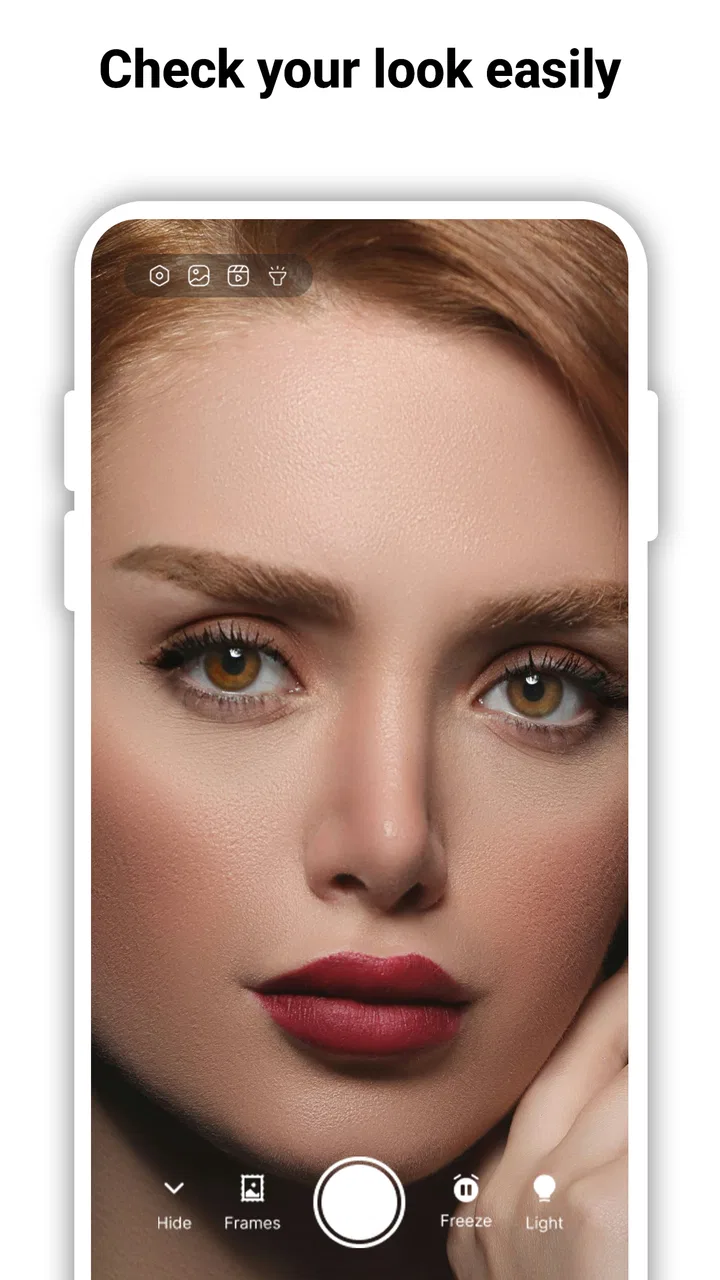
I tried True Mirror: Magnifying Mirror as a practical beauty tool rather than treating it like a full makeup editor, and that distinction matters. It is designed to turn a phone into a close-up mirror, with zoom and an LED light intended for moments when a normal mirror is inconvenient. In my experience, the appeal is straightforward: instead of opening a camera app and dealing with distracting controls, I can use a focused screen for checking makeup, shaving, grooming, or small details on my face.
The app comes from TAKA TECHNOLOGY VN CO., LTD and sits in the beauty category. It is free to install, suitable for Everyone, and available on devices running Android 7.0 or later. Its current version is 1.0.7, and the app has reached over 10 thousand installs. Those details place it in the lightweight, practical-tool part of the Android catalog rather than among large photo-editing packages.
How True Mirror fits into everyday use
The first thing I noticed about this kind of app is that its usefulness depends less on creative effects and more on how quickly it gets out of the way. A mirror app should not make me search through menus before I can see my face. True Mirror’s central idea is easy to understand: use the phone’s display as a mirror, enlarge the view when a closer look helps, and use the LED light when the surroundings are too dim.
You May Also Like

 AccuWeather: Weather Radar
AccuWeather Review: A Quick, Clear Forecast for Everyday Decisions
For everyday plans, the best forecast is the one you can understand quickly. AccuWeather makes rain timing, radar, and local conditions easy to act on, with a few trade-offs.

 Hill Climb Racing
Why Hill Climb Racing Still Turns Crashes Into One More Run
A tiny car, a bumpy hill and one more upgrade: Hill Climb Racing keeps resurfacing because its simple chaos makes every near-miss feel personal.

 AliExpress - Shopping App
AliExpress Makes Global Shopping Feel Personal, but Shoppers Bear the Risk
AliExpress turns a global marketplace into a pocket-sized discovery engine. Its reach is useful, its shopping loop compelling, and its trade-offs easy to miss.

 Lords Mobile: Kingdom Wars
Lords Mobile Is a Kingdom-Building Routine, Not a Quick Match
A case-by-case verdict on the building, battles, device demands, and social commitments that make Lords Mobile rewarding for some players and exhausting for others.

 PDF Scanner app - TapScanner
TapScanner Makes Paperwork Easier to Capture, Check, and Share
TapScanner makes scanning with a phone feel less like a rescue operation and more like a dependable step in getting work done. Its capture tools are useful, though not flawless.

 Block Blast!
 Shows How Much a Puzzle Game Can Leave Out
A quiet grid game shows why puzzle players increasingly value instant clarity, repeatable skill and low-pressure play—and where the genre still needs to catch up.
More From Our News Desk
View All News


That makes it a good companion for small, specific tasks. I would use it before leaving home to check whether eyeliner has smudged, while travelling to inspect a contact-lens area, or after eating to look for something caught between my teeth. Someone who shaves away from a bathroom mirror may also find the combination of a magnified view and extra illumination more useful than a standard front-facing camera preview.
The strongest part of the experience is its immediacy. It is not trying to replace a salon mirror, a beauty camera, or a photo editor. It is a pocket-sized viewing aid. That narrow purpose is also its main limitation, because users expecting skin retouching, virtual makeup, saved portraits, or social-media tools will likely find the experience too basic.
Speed expectations when opening the mirror
For a tool like this, perceived speed is mainly about the time between tapping the app and getting a usable view. I found the concept most convincing when I treated it as a quick utility: open it, position the phone, adjust the view, and finish the check. The less I expected from it, the more natural it felt.
Zoom is especially helpful when the phone is held at a comfortable distance. Holding a device extremely close to the face can be awkward, and it also makes it harder to keep the image steady. A moderate enlargement lets me keep my arm relaxed while still inspecting small details. I prefer making the adjustment before starting a grooming task, rather than repeatedly changing it while holding tweezers, a razor, or a makeup brush.
The LED option is best understood as a situational aid, not a replacement for proper lighting. It can help when a hotel bathroom is poorly lit or when I am checking my face in a hallway, but direct phone illumination can create strong highlights and shadows. For precise makeup work, soft light from in front of the face remains better. The app is most useful when it solves a temporary visibility problem, not when I expect it to create studio-quality lighting.
One practical habit improves the experience: clean the phone’s front-facing camera area before opening the app. A fingerprint or dust mark can make a close-up view look hazy, which may feel like an application problem even though the obstruction is on the device. I also found it easier to position the phone first and then make small zoom changes, rather than trying to compose the view while moving around.
What happens during heavier or longer use
Short checks are the natural workload here, but some users will keep the app open while applying makeup or shaving. In that situation, the phone is doing more than displaying a static screen: it is maintaining a live camera view, and the light may be active at the same time. That combination can be more demanding than simply browsing a beauty guide or reading a message.
I would therefore use it in stages. First, set the phone on a stable surface or hold it securely. Next, choose the brightness conditions and zoom level. Then complete one part of the routine before repositioning the device. This reduces the need to keep changing controls and makes the app feel less tiring during a longer session.
The LED is also where sensible use matters most. If the phone begins to feel warm, I would switch the light off between checks rather than leaving it active continuously. That is not a criticism unique to this app; any phone using its camera and light for an extended period can become less comfortable to hold. True Mirror works best as an intermittent assistant, not as a permanent replacement for a wall-mounted mirror.
There is another trade-off with heavy use: the larger the image, the more obvious ordinary camera limitations become. Zoom can help me see a detail, but it cannot magically create extra facial detail. At high enlargement, slight hand movement becomes more noticeable, and the view may feel less natural than a real mirror. I get the best results from modest zoom and a steady grip.
Stability and recovery in real situations
A mirror utility earns trust when it behaves predictably during a rushed moment. I would be especially likely to use it in a train-station restroom, a shared bathroom, or a hotel room, where I do not want to spend time configuring a camera. The app’s simple purpose gives it a clear advantage over a general camera application filled with photo modes and editing controls.
Even so, the surrounding phone environment affects reliability. If another application is using the camera, if the device is low on available resources, or if the phone is struggling in a warm environment, a live camera tool may not feel as smooth as it does during a short, fresh launch. My practical response would be to close unnecessary camera or video apps, reopen True Mirror, and give the phone a stable position before judging the result.
Recovery is also easier when the workflow is simple. I would not begin a detailed grooming task until the live view is visible and the image is steady. If the view becomes inconvenient, stopping and reopening the app is less frustrating than trying to continue while the phone is poorly positioned. The app’s value comes from reducing friction, so a quick reset is preferable to forcing it through an awkward setup.
Because the product is focused on viewing rather than editing, there are fewer creative layers to interrupt the process. That is a genuine benefit for people who want a mirror and nothing more. On the other hand, users who rely on saved reference images, before-and-after comparisons, or detailed camera controls may prefer the phone’s standard camera or a dedicated beauty application.
Device constraints that affect the experience
True Mirror supports Android 7.0 and newer, which gives it a broad potential device range. Still, the age of a phone can influence the practical result. An older handset may have a less capable front camera, a dimmer display, slower camera startup, or a weaker LED. The application cannot fully overcome those hardware differences.
Screen size matters too. A larger display is more comfortable for checking a broad area of the face, while a compact phone is easier to carry and hold but gives less room for close inspection. I would choose a comfortable viewing distance before relying heavily on zoom, especially if I am trying to keep my hand steady during shaving or eyebrow grooming.
Battery condition is another consideration. A brief mirror check should be easy to fit into a normal day, but repeated use of a live camera and LED can be an unnecessary drain when the phone is already low. If I were travelling, I would use the app for quick inspections and reserve longer grooming sessions for places with better lighting and access to charging.
Privacy-conscious users may also appreciate the narrow purpose, but I would still treat it like any camera-based application: use it only in appropriate surroundings and avoid pointing the phone at other people without permission. The app is meant for personal viewing, and that is how I would use it.
Who will appreciate it, and who should skip it
I think True Mirror is a sensible choice for people who frequently find themselves without a convenient mirror. Travellers, commuters, students, people who share bathrooms, and anyone who keeps grooming tools in a bag can benefit from having a dedicated mirror-style utility ready on the phone. It is also useful for quick checks where carrying a physical compact mirror feels impractical.
The app suits users who value a direct workflow more than a long feature list. If I only need to see my face, enlarge a small area, and improve visibility in a dark place, its focused design makes sense. The free entry point also makes it easy to try without committing to a purchase.
I would skip it if my priority is professional makeup lighting, detailed skin analysis, beauty filters, image correction, or recording tutorials. A physical mirror with adjustable lighting is better for a stable, hands-free routine. A standard camera may be preferable for people who need more control over focus, exposure, or saved images. True Mirror is not the right tool simply because it is in the beauty category; its value depends on wanting a live mirror first.
Value, paid options, and the overall trade-off
The app is free, but in-app purchases range from $14.99 to $49.99 per item. That makes it important to decide what role the application has in your routine before spending money inside it. For occasional checks, the free starting point may be enough. A paid option only makes sense to me if it removes a specific annoyance or adds something I genuinely use often, rather than because I feel pressure to unlock every available option.
Its average rating is 4.1 from around 22 ratings, with 3 written reviews, so the public response is still relatively small. I would treat that as an early signal rather than a definitive verdict. The app has been available since May 10, 2025, and its install count suggests that it is still a modest utility rather than a deeply established platform.
The developer, TAKA TECHNOLOGY VN CO., LTD, has kept the concept easy to grasp. That clarity is valuable: I know why I would open the app, and I know when another tool would be more appropriate. The trade-off is that a focused mirror does not offer the depth of a full beauty suite. I would rather see this app judged by how well it handles quick visibility problems than by the number of decorative features it does not try to provide.
My performance verdict after using it
My overall impression is positive but specific. True Mirror is a practical Android beauty utility for short, close-up checks, and its zoom and LED functions address two real problems: details can be hard to see, and available lighting is not always good. It feels most effective when I use it briefly, keep the zoom moderate, clean the camera area, and position the phone before starting a task.
Its performance expectations should remain realistic. The phone’s camera, screen, battery, and lighting hardware still determine much of the experience. Extended camera-and-light use can be less comfortable than a physical mirror, and high enlargement can make hand movement more noticeable. Those are meaningful trade-offs, but they do not undermine the app’s central purpose.
I would recommend it to anyone who wants a quick pocket mirror with extra visibility, not to someone searching for a complete beauty studio. For travel, emergency grooming, and small checks between normal mirror access, it is a convenient free app to try. If your routine demands hands-free stability, soft professional lighting, or advanced image tools, a physical illuminated mirror or a more capable camera application will serve you better.
In the end, the app succeeds when I judge it as a focused tool. It does not need to transform a face or manage a beauty routine to be useful. It only needs to help me see clearly at the moment I need it, and that is where True Mirror: Magnifying Mirror makes the most convincing case for keeping it installed.
FAQs for True Mirror: Magnifying Mirror
01What is True Mirror: Magnifying Mirror, and how does it work?
True Mirror: Magnifying Mirror is an app designed to transform your device into a high-quality magnifying mirror. It uses your phone’s camera to provide a clear, magnified reflection, allowing you to see details up close. Ideal for makeup application or grooming, the app offers adjustable magnification and lighting options to enhance visibility.
02Is True Mirror: Magnifying Mirror safe for my device?
Yes, True Mirror: Magnifying Mirror is safe to download and use. It doesn't require excessive permissions beyond accessing the camera and storage for saving images. Always ensure you download it from trusted sources like Google Play Store or Apple App Store to avoid malicious versions.
03Does True Mirror: Magnifying Mirror require an internet connection?
No, True Mirror: Magnifying Mirror operates offline. Once installed, you can use all its features without needing an internet connection. This makes it convenient for use in areas with limited connectivity while ensuring your privacy since data is not sent online.
04What are the main features of True Mirror: Magnifying Mirror?
The app offers several features, including adjustable zoom levels, different lighting modes, and the ability to take and save snapshots. It also provides a stable image with minimal lag, making it easy to use for various personal grooming tasks.
05Are there any in-app purchases or ads in True Mirror: Magnifying Mirror?
True Mirror: Magnifying Mirror may include ads or offer in-app purchases to unlock additional features, such as ad-free experiences or enhanced magnification tools. Users can choose to purchase these options if they wish to enhance their app experience.
Pros
- High resolution for clear reflections.
- User-friendly interface with intuitive controls.
- Offers zoom feature for detailed views.
- Adjustable brightness for different settings.
- Minimal ads for a seamless experience.
Cons
- Limited to front camera usage.
- Lacks advanced editing features.
- No option for saving mirror images.
- Consumes more battery than expected.
- Requires frequent updates for stability.

True Mirror: Magnifying Mirror
Gallery